It comes back on its own
systemd restarts a server that fails and brings your servers back after a reboot. One you stopped stays stopped until you start it.
 Chi Rho Code
Your own Valheim, Palworld and custom game servers, on a Linux machine you control, run from the terminal.
Every deployment, settings change and setup step is shown to you in full before it happens. Nothing changes until you press y.
Version 1.1.1

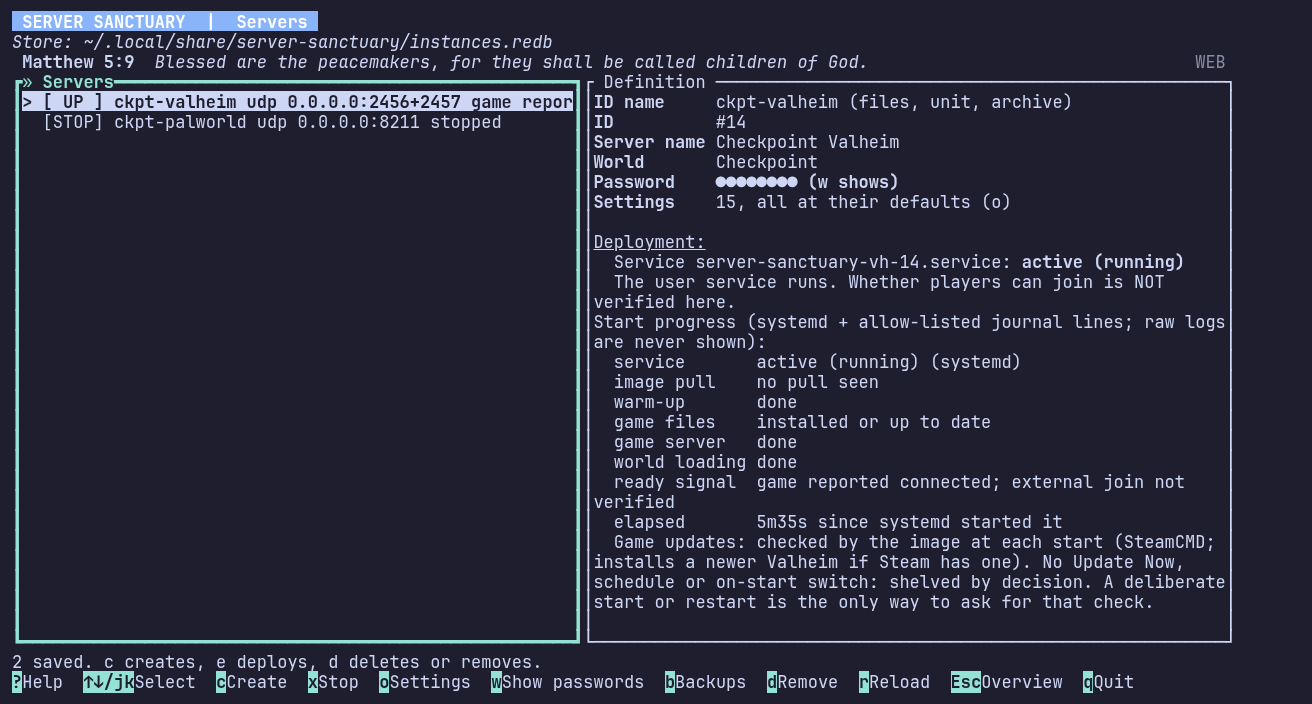
The Servers screen reads systemd and the game’s own log lines, and says what it saw. UP means the game reported it is connected.
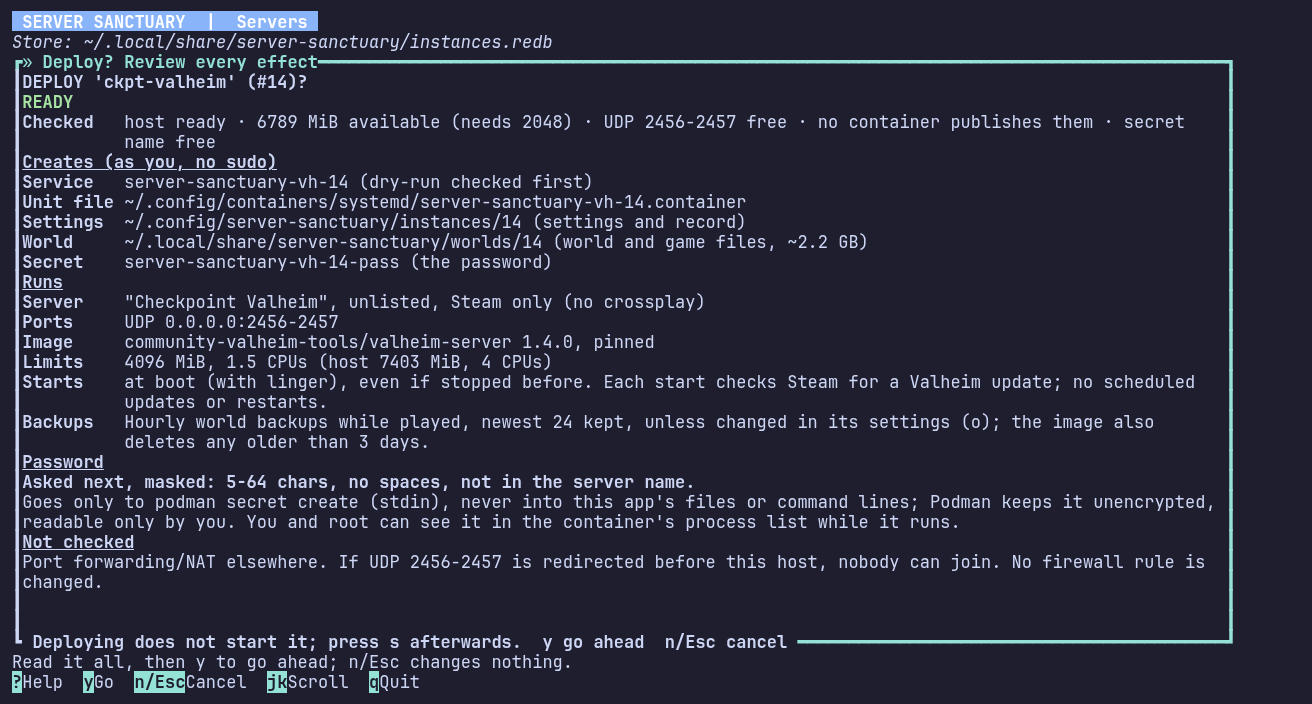
Every deployment opens a review of everything it will create and run, and what it leaves unchecked. y goes ahead; n or Esc changes nothing.
Everything that keeps a single server safe and working comes with the free tier. Pro adds tools for people who run many servers.
systemd restarts a server that fails and brings your servers back after a reboot. One you stopped stays stopped until you start it.
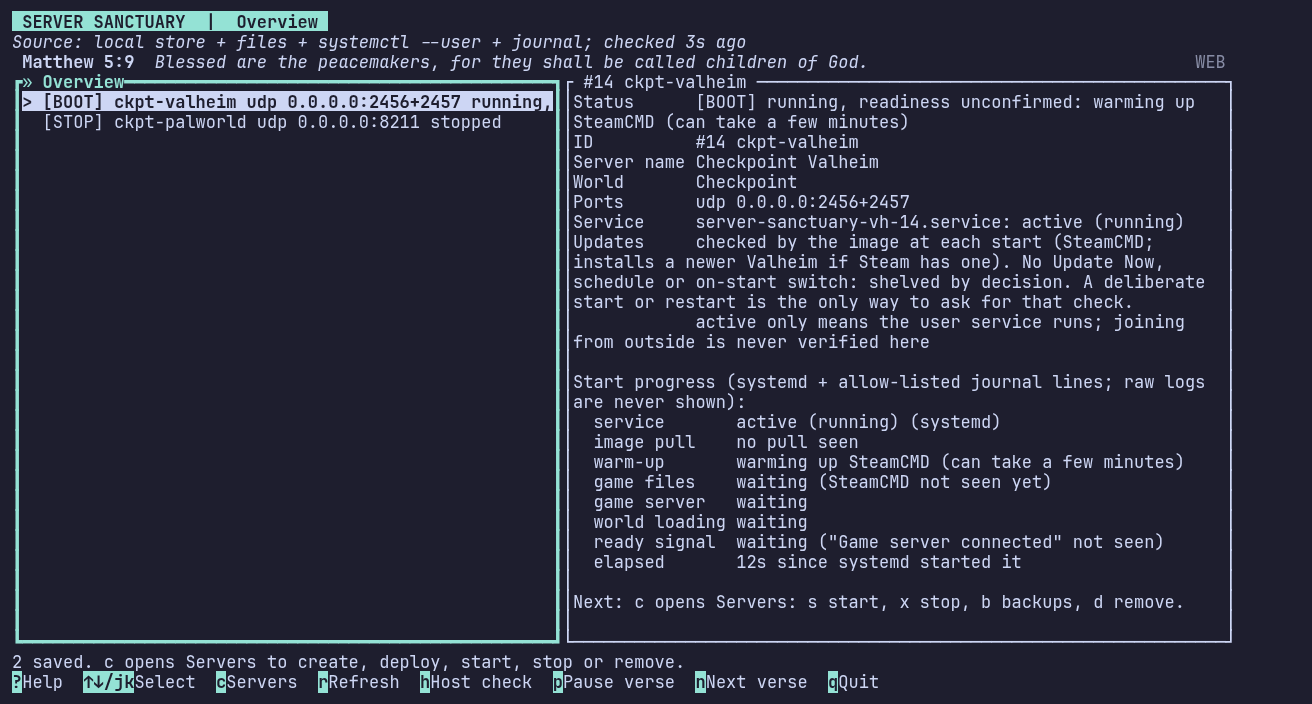
Each start shows its stages as they happen, from systemd and the game’s own log lines: warm-up, game files, world loading, ready.
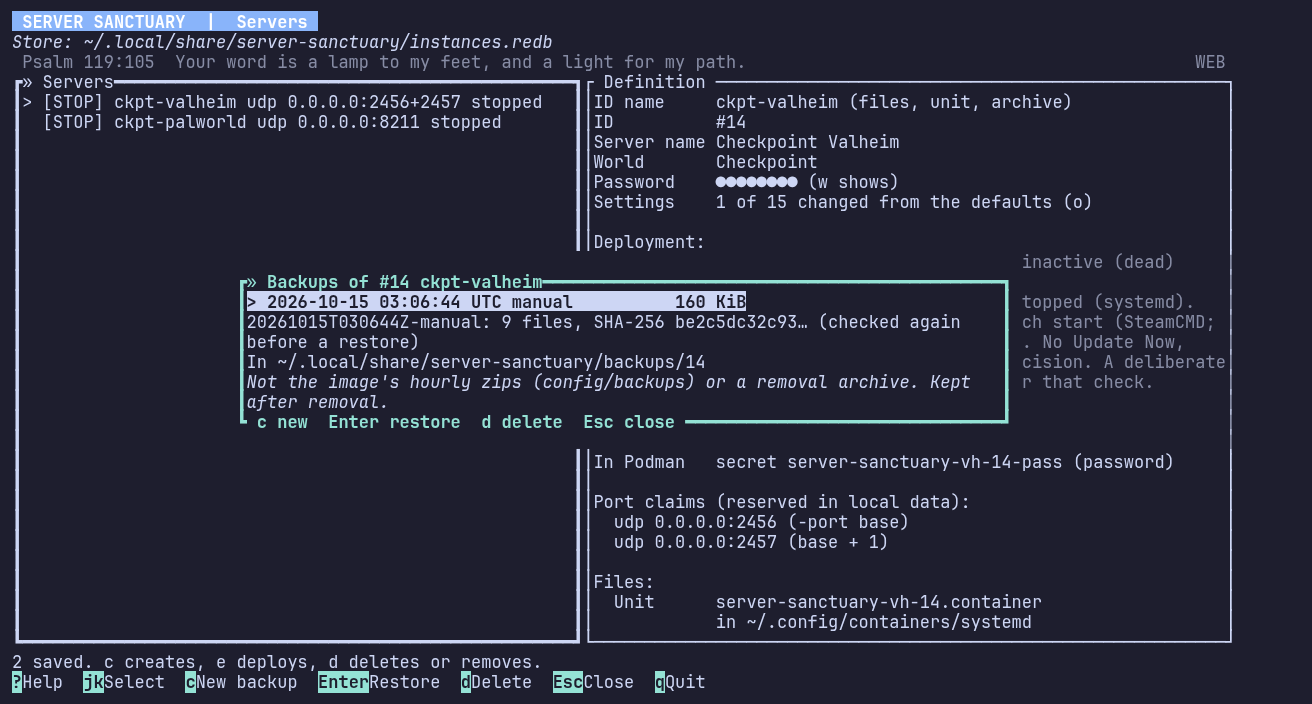
World backups when you ask, or daily or weekly with a number to keep. Each has a SHA-256 that is checked again before a restore. App backups keep your list of servers and settings: one is made on each upgrade, and A makes one any time.
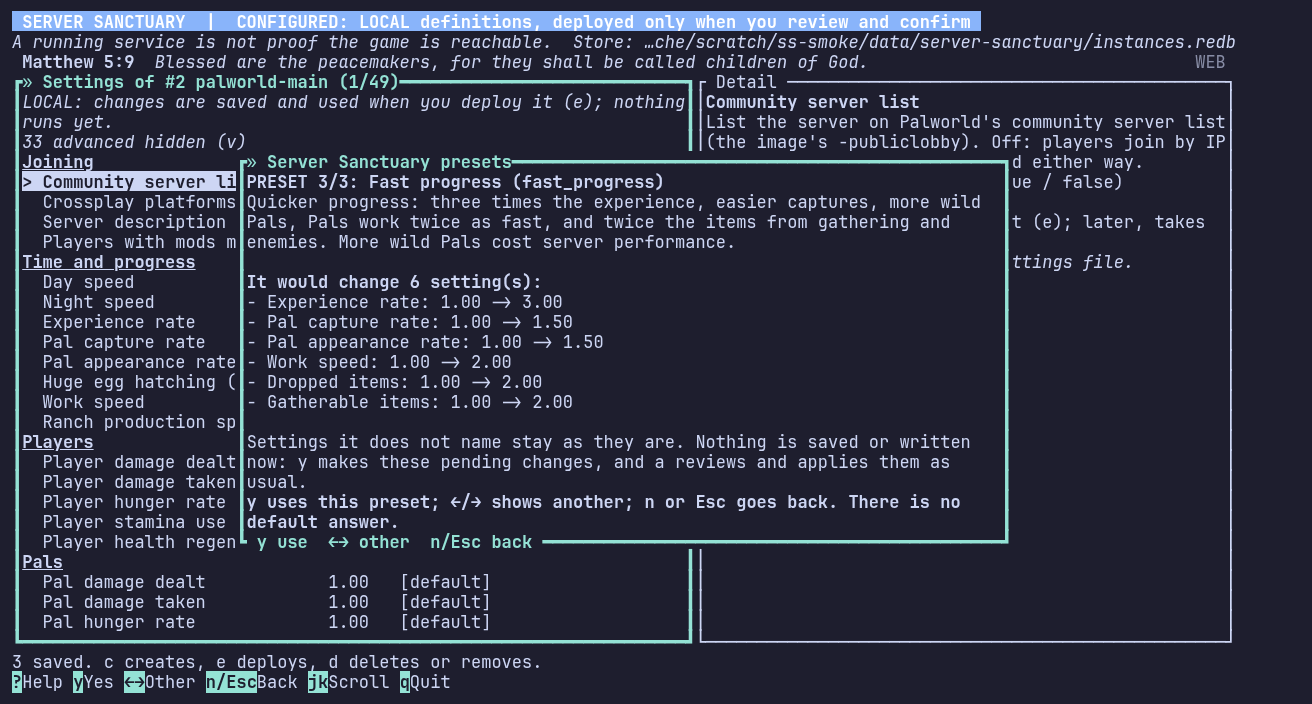
Valheim and Palworld settings in plain names, with presets for Palworld. Every change is listed before it is saved.
Each time a Valheim or Palworld server starts, it checks Steam for a newer game build and installs it first. u updates a server now, and U sets a daily or weekly time that waits while players are online.
$ server_sanctuary status --json
$ server_sanctuary backup 3
$ server_sanctuary ban 3 76561190000000001
$ server_sanctuary stop 3Ban and unban players, see who is online and what happened in the Log, and drive it all from scripts with the headless commands.
[CONF] valheim-main udp 2456+2457
Next: e reviews a deployment.
Describe it: game, name, world, ports and settings. Nothing runs yet.
[STOP] valheim-main udp 2456+2457
Next: s starts it, x stops it, b backups, d removes it.
Read the review and press y. It deploys as you, without sudo.
[BOOT] valheim-main udp 2456+2457
running, readiness unconfirmed: warming up SteamCMD
Press s and watch each stage arrive, up to the ready signal.
[ UP ] valheim-main udp 2456+2457
game reported connected; external join not verified
Friends join. Crash restarts and backups carry on without you.
For people who run many servers on many machines.
The servers of up to 25 machines in one list, reached over SSH with your own keys. Start, stop or restart any of them, or all at once.
One ban reaches every server of that game on every machine, and new servers start with the shared ban list.
One settings change for several servers of a game, with one review, and their restarts one after another.
Everyone seen on this machine: first and last seen, servers, joins and time played, with an export.
One-time prices, not subscriptions, for one person each. A licence covers every 1.x release from 1.1.1 on.
| Licence | Price | Game servers per machine | Machines | Pro features | Buy |
|---|---|---|---|---|---|
| Free | $0 | 2 servers per machine | Any number of machines | No Pro features | No key needed |
| Community | $15 once | Unlimited servers | Up to 5 machines | No Pro features | Buy Community, $15 |
| Pro | $30 once | Unlimited servers | Up to 25 machines | Pro features | Buy Pro, $30 |
| Pro Upgrade | $15 once | Unlimited servers | Up to 25 machines | Pro features, added to Community | Buy Pro Upgrade, $15 |
Free runs up to 2 game servers on each machine, on as many machines as you like, with no key.
Adding your key to a machine uses one of its machine slots. You can move a licence to another machine from inside the app.
Polar handles payment, tax and receipts as merchant of record.
Refunds within 14 days, no questions asked, minus the payment fee Polar keeps: about $1.25 on a $15 key and $2.00 on a $30 key, a little more for cards from outside the US. Email us or use your Polar order page. A refunded key stops working and its machines fall back to Free.
The free tier runs the same checks, so you can try it on your machine before you pay.
The Host check runs read-only checks for all of this. On Ubuntu Server it can install Podman and turn on linger, one step at a time after you approve each. Your password goes to sudo, never to the app.
The ARM build hasn’t run on real ARM hardware yet. Valheim can’t be deployed on ARM, and Palworld runs there through box64 emulation, untested.
One program, built for x86_64 and for 64-bit ARM. Each release is signed, so you can check your download.
Releases are signed with minisign, key ID 0814E53E32EAC1E1. Save these two lines as minisign.pub:
untrusted comment: minisign public key 0814E53E32EAC1E1
RWThweoyPuUUCC7h9W/6n+qHzga95k3Lxzi6kCqVoO747X+/lr3usXT+
Get minisign with sudo apt-get install minisign on Ubuntu 24.04 or newer. Ubuntu 22.04 has no package, so download it from minisign’s releases.
Put it in one folder with the program, SHA256SUMS and SHA256SUMS.minisig, then:
$ minisign -Vm SHA256SUMS -p minisign.pub
$ sha256sum -c --ignore-missing SHA256SUMS
$ chmod +x server_sanctuary-$(uname -m)-linux-gnu
$ ./server_sanctuary-$(uname -m)-linux-gnu
The first command should print Signature and comment signature verified.
No. Server Sanctuary runs on your own Linux machine: a home server, a spare PC or a server you rent. Each game server is a rootless Podman container under a systemd user service, owned by your user.
Each server’s detail shows how to join: your local address and port for players at home, and your public address with the ports to forward on your router for everyone else. With Valheim’s crossplay on, it shows the join code too.
A STUN request to learn your public address, a licence check with Polar once you add a key, and a daily check for a new version, plus the game downloads themselves. The privacy page lists each one, and how to turn the version check off.
Valheim and Palworld run unmodded. Any other game server you can describe in a TOML profile can run as a custom server, and a commented Minecraft Bedrock example is included.
Chi Rho Code is a Christian company. When the status line has nothing else to say, it shows a short verse from the World English Bible: p pauses it, n skips to the next. A notice, an error or progress always takes its place.
Server Sanctuary is free for 2 servers on every machine, with no key and no account. Buy a licence when you need more.
Download for LinuxEmail help@chirhocode.com. We aim to answer within 48 hours.
Write to us to free the slot of a machine that was lost or wiped, about your licence or a refund, or when something doesn’t work.